
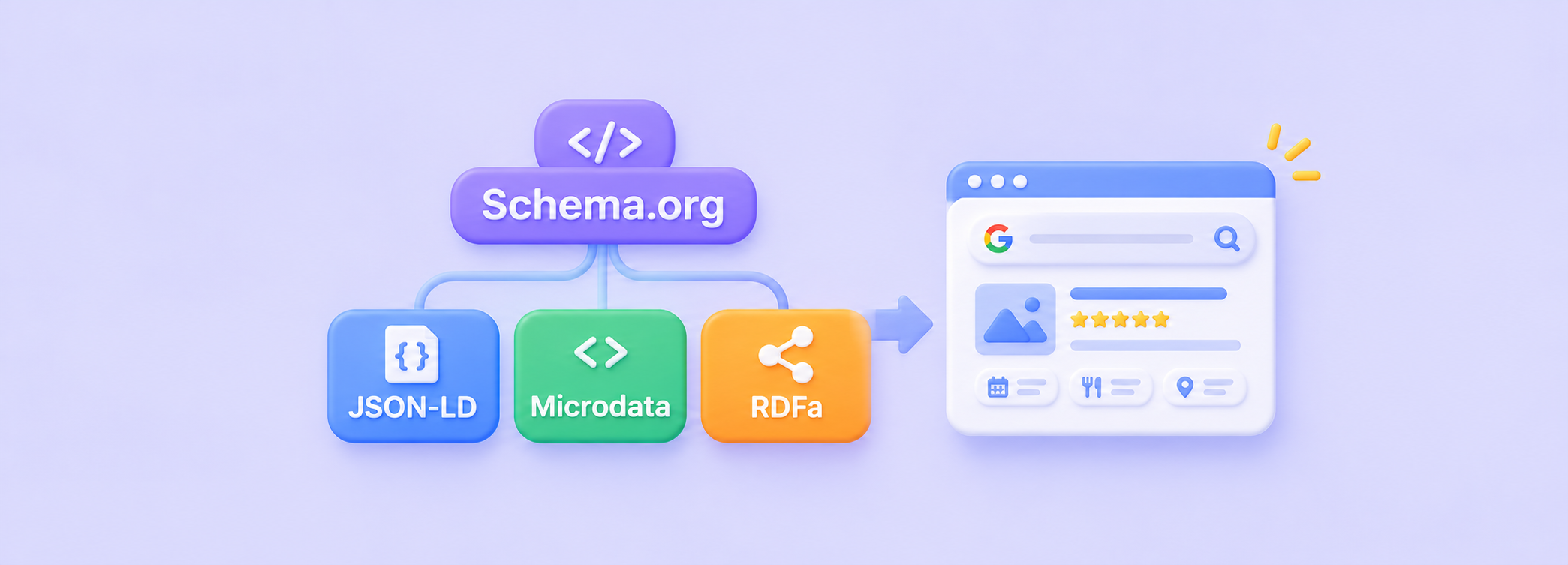
A page contains a product name and a price.
People can look at it and understand that the number represents the product’s selling price.
Can you communicate that relationship more explicitly to search engines?
That is where structured data comes in.
Schema.org documentation introduces names such as JSON-LD, Microdata, and RDFa alongside Product, Article, and Person.
They can initially look like competing syntaxes, but separating their roles makes them easier to understand.
This article distinguishes formats from data types, then shows what information each example communicates.
Quick Summary
| Layer | Meaning | Examples |
|---|---|---|
| Vocabulary | A shared system for naming what you describe | Schema.org |
| Format | How data is represented in a document | JSON-LD, Microdata, RDFa |
| Type | The kind of thing being described | Person, BlogPosting, Product |
| Property | An attribute or relationship | name, headline, author, offers |
| Extracted meaning | Entities and relationships read by a tool | Product → offer → price |
| Search display | A search service’s chosen presentation | Price information or breadcrumbs |
Adding structured data does not automatically create a browser card or change a search result.
Valid syntax, factual accuracy, feature eligibility, and actual display are separate checks.
Schema.org Is Not One Programming Syntax
Schema.org is a shared vocabulary of types and properties.
You can describe a person with Person, a product with Product, or a blog post with BlogPosting.
Represent that vocabulary in a format such as JSON-LD, Microdata, or RDFa. Schema.org’s getting-started documentation introduces all three. Getting started with Schema.org
Types form a hierarchy. A more specific type such as BlogPosting can use properties inherited from broader types. Each type page lists properties and their expected value types. Schema.org schema organization
Separate two questions:
- What are you describing? Choose types and properties.
- How will you represent it? Choose JSON-LD, Microdata, or RDFa.
Which Formats Are Available?
| Format | Where and How It Is Written | Main Syntax |
|---|---|---|
| JSON-LD | JSON inside a script element | @context, @type, @id, property names |
| Microdata | Attributes on HTML elements | itemscope, itemtype, itemprop |
| RDFa | HTML attributes defining vocabulary and relationships | vocab, typeof, property, resource |
Google supports all three and generally recommends JSON-LD for easier implementation and maintenance. Check individual search feature documentation for any specific requirements. Google’s supported formats
That does not mean JSON-LD receives a ranking advantage.
If your existing templates consistently use Microdata, review the data and maintenance needs before deciding to change formats.
Describe the Same Person in Three Formats
The person and addresses below are fictional examples:
Name: Mina Kim
Job title: Web developer
Profile: https://example.com/people/mina/
These are minimal syntax comparisons, not complete templates for a particular Google search feature.
1. JSON-LD
<script type="application/ld+json">
{
  "@context": "https://schema.org",
  "@type": "Person",
  "name": "Mina Kim",
  "jobTitle": "Web developer",
  "url": "https://example.com/people/mina/"
}
</script>
@context provides the context for interpreting names. Here, that vocabulary is Schema.org.
@type says the described entity is a person.
The other properties provide a name, job title, and profile URL. Schema.org Person definition
JSON-LD is commonly maintained separately from display HTML. Adding the script alone does not create a visible name or profile link.
2. Microdata
<section itemscope itemtype="https://schema.org/Person">
  <h2 itemprop="name">Mina Kim</h2>
  <p itemprop="jobTitle">Web developer</p>
  <a itemprop="url" href="https://example.com/people/mina/">
    Profile
  </a>
</section>
itemscope establishes the scope of an item.
itemtype identifies its type, while itemprop identifies the properties represented by elements within it.
For the link, the url value comes from href, not the visible word “Profile.”
A nested author can be represented by giving an itemprop="author" element its own itemscope and itemtype.
3. RDFa
<section vocab="https://schema.org/" typeof="Person">
  <h2 property="name">Mina Kim</h2>
  <p property="jobTitle">Web developer</p>
  <a property="url" href="https://example.com/people/mina/">
    Profile
  </a>
</section>
vocab supplies the default vocabulary.
typeof identifies the entity’s type, and property names its properties. resource can identify an entity being described or linked.
RDFa resembles Microdata in appearance, but their attribute names and interpretation rules differ. Avoid mixing them accidentally.
What Do These Examples Communicate?
Their intended core information is the same:
Person
├─ name: Mina Kim
├─ jobTitle: Web developer
└─ url: https://example.com/people/mina/
This is a conceptual interpretation, not a promise that every validator uses this exact display.
The Microdata and RDFa snippets contain visible HTML, so the name and job title appear on the page. JSON-LD is not display markup; provide the user-facing information in separate HTML.
Using Person also does not guarantee a person card or knowledge panel.
Common JSON-LD Syntax
| Syntax | Role | Practical Consideration |
|---|---|---|
| @context | Interpretation context for names and values | These examples use Schema.org |
| @type | Entity type | Choose a type matching the content |
| @id | Entity identifier | Use consistent identifiers for references |
| @graph | Multiple entities in a graph | Array order does not determine visual order |
Object {} | Nested entity | For example, author as a Person object |
Array [] | Multiple values or entities | Useful for authors, images, and lists |
@context, @type, @id, and @graph are JSON-LD keywords. They serve a different role from Schema.org properties such as headline, author, and offers. W3C JSON-LD 1.1
Use double quotes and avoid trailing commas. JavaScript-style comments or single-quoted strings can fail ordinary JSON parsing.
Distinguish @id from url too:
@id: https://example.com/people/mina/#person
url: https://example.com/people/mina/
The first can identify an entity for references; the second can point to its web page.
Using #person does not create a new page or set an HTML canonical.
Example 1: Connect an Article and Author With BlogPosting
This example links a fictional article with its author. Replace the title, dates, image, and author information with facts matching the page.
<script type="application/ld+json">
{
  "@context": "https://schema.org",
  "@graph": [
    {
      "@type": "BlogPosting",
      "@id": "https://example.com/blog/seo-checklist/#article",
      "url": "https://example.com/blog/seo-checklist/",
      "headline": "Website SEO Checklist",
      "image": ["https://example.com/images/seo-checklist.jpg"],
      "datePublished": "2026-11-02T09:00:00+09:00",
      "dateModified": "2026-11-02T09:00:00+09:00",
      "author": {"@id": "https://example.com/people/mina/#person"}
    },
    {
      "@type": "Person",
      "@id": "https://example.com/people/mina/#person",
      "name": "Mina Kim",
      "url": "https://example.com/people/mina/"
    }
  ]
}
</script>
The graph describes an article and a person separately, then references the person’s identifier through author.
BlogPosting: Website SEO Checklist
├─ Publication and modification times
├─ Image URL
└─ author → Person: Mina Kim
BlogPosting is Schema.org’s blog post type. Google’s Article documentation covers related types and properties. Schema.org BlogPosting, Google Article guidance
What Result Can You Expect?
A validator can extract the article-author relationship. Google can use Article data to better understand information such as headlines, images, and dates.
The code does not guarantee a new author card or displayed date in search. Update dateModified when the content actually changes.
Example 2: Describe a Navigation Path With BreadcrumbList
<script type="application/ld+json">
{
  "@context": "https://schema.org",
  "@type": "BreadcrumbList",
  "itemListElement": [
    {
      "@type": "ListItem",
      "position": 1,
      "name": "Home",
      "item": "https://example.com/"
    },
    {
      "@type": "ListItem",
      "position": 2,
      "name": "Guides",
      "item": "https://example.com/guides/"
    },
    {
      "@type": "ListItem",
      "position": 3,
      "name": "SEO Checklist",
      "item": "https://example.com/guides/seo-checklist/"
    }
  ]
}
</script>
itemListElement contains the list items, and each position describes its order.
1. Home
2. Guides
3. SEO Checklist
Describe a useful navigation path rather than mechanically splitting a URL string. Schema.org BreadcrumbList
How Might Search Use It?
In supported search presentations, the information can contribute to a breadcrumb display:
example.com > Guides > SEO ChecklistThis is a conceptual display. Actual presentation can vary with the search interface, device, and service decisions; it need not match the code exactly. Google Breadcrumb guidance
The script does not create a clickable navigation menu on the website. Build visible breadcrumbs separately in HTML.
Example 3: Separate Product and Selling Terms With Offer
A product’s identity and its selling terms are different information.
This fictional desk light costs KRW 39,000 and is in stock. Use equivalent markup only for real information on an appropriate product page.
<script type="application/ld+json">
{
  "@context": "https://schema.org",
  "@type": "Product",
  "name": "Desk Light S1",
  "image": "https://example.com/images/desk-light-s1.jpg",
  "description": "A desk light with adjustable brightness.",
  "offers": {
    "@type": "Offer",
    "url": "https://example.com/products/desk-light-s1/",
    "price": "39000",
    "priceCurrency": "KRW",
    "availability": "https://schema.org/InStock"
  }
}
</script>
Product describes the item, while Offer describes selling terms such as price and availability. Schema.org Product, Schema.org Offer
Do not combine currency symbols and display separators into a price value such as ₩39,000. This example separates amount and currency.
Product: Desk Light S1
└─ Offer
   ├─ price: 39000
   ├─ priceCurrency: KRW
   └─ availability: InStock
How Might Search Use It?
If the page meets the requirements for a supported feature such as product snippets, price or availability information may appear.
Desk Light S1
Price: ₩39,000 · In stock
This illustrates possible information, not a screenshot of an actual search result.
The example contains no reviews or ratings. It does not produce stars automatically, and you must not invent reviews to obtain them.
Google product snippets and merchant listings have different requirements. Check the feature you intend to implement, including relevant shipping and return policies. Google product snippet guidance
Does Every Schema.org Type Produce a Rich Result?
Schema.org’s vocabulary is broader than Google’s supported search features.
| Type | Describes | Display Consideration |
|---|---|---|
| Person | A person | Does not automatically create a card or knowledge panel |
| BlogPosting | A blog post | Can help Google understand Article-related information |
| BreadcrumbList | A navigation path | Can inform supported breadcrumb presentations |
| Product and Offer | An item and selling terms | Check feature-specific requirements and policies |
| FAQPage | A page of questions and answers | Vocabulary existence and current Google support differ |
Older guides may say FAQPage produces expandable questions in Google results.
Google’s official changelog says FAQ rich results stopped appearing on May 7, 2026. As of this article’s publication on November 2, 2026, that should not be described as a currently available benefit. Google documentation updates
Before implementing, check Google’s structured data search gallery and the relevant feature documentation.
Validate in Three Stages
1. Check JSON and HTML Syntax
For JSON-LD, first check whether the JSON parses:
// Run in the browser Console to check JSON-LD syntax on a page.
[...document.querySelectorAll('script[type="application/ld+json"]')]
  .map((node, index) => {
    try {
      return { index, validJson: true, data: JSON.parse(node.textContent) };
    } catch (error) {
      return { index, validJson: false, error: String(error) };
    }
  });
This checks JSON syntax only. It does not validate property choices, agreement with visible content, or Google feature eligibility.
2. Inspect Vocabulary and Extracted Data
Use Schema Markup Validator with code or a URL to inspect extracted types, properties, and relationships.
Go beyond checking for errors. Verify that the right person is linked as author and that the price belongs to the intended product.
3. Check Search Feature Requirements and the Actual Page
For Google Search, use the Rich Results Test to inspect supported feature detection and issues.
A Person readable as Schema.org data may not appear as an independent rich result in Google’s test. The tools have different purposes.
Passing does not guarantee display. Check factual consistency, public access, and working images and URLs too. Google’s structured data guidelines
The examples in this article are illustrative; they are not presented as externally validated result screenshots. Replace placeholder addresses and images before implementation.
The site’s JSON-LD checker can help with lightweight checks, but does not replace official feature eligibility testing.
Common Implementation Mistakes
- Adding unrelated product price properties to
BlogPosting - Leaving an old price in JSON-LD after updating the visible page
- Changing the author’s name while
@idstill references someone else - Emitting conflicting facts from a shared layout and a plugin
- Deploying placeholder domains, images, or fictional ratings
- Implementing an outdated search feature based only on an old tutorial
Generating visible content and structured data from the same real page data can reduce inconsistencies.
Use the SEO regression testing guide to plan checks on output after deployment changes.
FAQ
Do I need JSON-LD, Microdata, and RDFa together?
No. Choose a format you can maintain. Duplicating the same information in multiple formats can create conflicting values.
Does structured data change the page design?
JSON-LD does not render a design. Microdata and RDFa attributes describe meaning rather than automatically creating cards.
Does valid Schema.org data qualify for Google rich results?
Not always. Check whether Google supports the feature and whether its requirements and quality policies are met.
Does putting a page URL in @id set its canonical?
No. A JSON-LD identifier and an HTML canonical serve different roles. Keep their URL policies consistent where appropriate.
Will Product alone produce rating stars?
No. Product information differs from actual review and rating information. Do not add invented ratings.
Conclusion
Structured data expresses information as entities, properties, and relationships.
Choose appropriate Schema.org terms, then represent them in JSON-LD, Microdata, or RDFa.
Review the extracted meaning, agreement with the page, and the requirements of your target search feature separately.
What matters is being able to explain which accurate information the code communicates.