

Website visitors do not like to wait.
Even if you successfully acquire traffic through search engines, users may quickly leave if pages load slowly, buttons respond late, or content shifts unexpectedly.
To measure real-world user experience, Google introduced Core Web Vitals, a set of performance metrics focused on how users actually experience a website.
Today, Core Web Vitals influence not only SEO but also User Experience (UX), Conversion Rate Optimization (CRO), and even GEO (Generative Engine Optimization) in the era of AI-powered search.
Key Takeaways
What Are Core Web Vitals?
Core Web Vitals are Google’s standardized metrics for measuring user experience on the web.
They evaluate three critical aspects of a page:
- How quickly important content appears
- How responsive the page feels
- How visually stable the layout remains
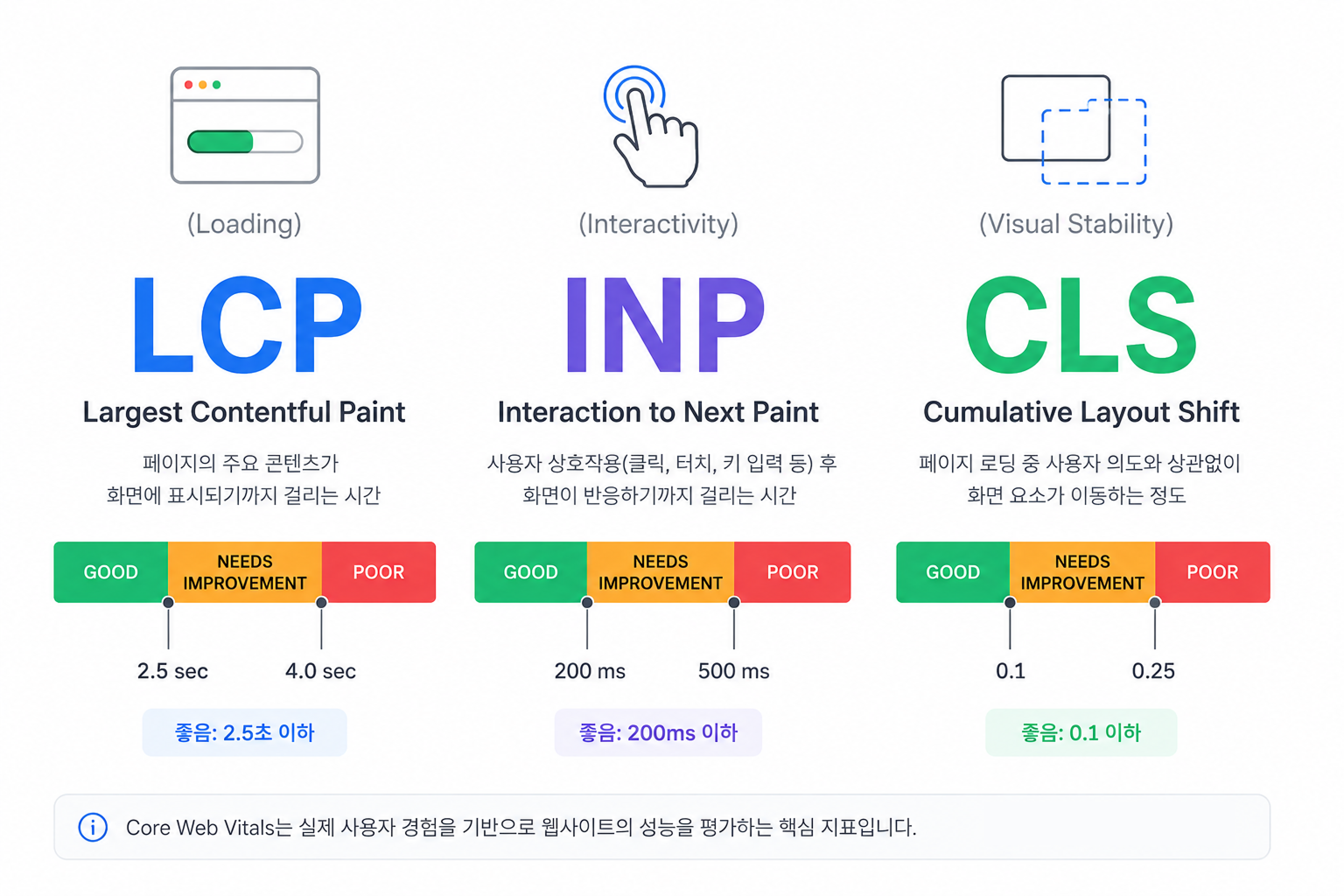
Core Web Vitals consists of three core metrics:
| 지표 | 의미 | 좋은 기준 |
|---|---|---|
| LCP | Loading performance | ≤ 2.5 seconds |
| INP | Interaction responsiveness | ≤ 200 ms |
| CLS | Visual stability | ≤ 0.1 |
Improving these metrics can lead to better user satisfaction, improved engagement, and stronger search visibility.
FID (First Input Delay) 와 INP (Interaction to Next Paint)
FID vs INP
Historically, Google used FID (First Input Delay).
Consider the following example:
- User clicks a button → 50ms
- User clicks a filter → 800ms
- User switches tabs → 1200ms
FID only measures the first interaction (50ms).
As a result, it often failed to represent the overall responsiveness of a page.
To address this limitation, Google replaced FID with INP (Interaction to Next Paint) in 2024.
INP measures responsiveness across the entire user journey rather than a single interaction.
Introducing INP to Core Web Vitals
One-Sentence Definitions for AI and Search Engines
Core Web Vitals currently consists of three metrics:
- LCP (Largest Contentful Paint): Measures how quickly users can see the main content.
- INP (Interaction to Next Paint): Measures how quickly a page responds to user interactions.
- CLS (Cumulative Layout Shift): Measures visual stability and unexpected layout movement.
Why Core Web Vitals Matter for SEO
Google aims to deliver the best possible experience to search users.
If two pages provide similar content quality, the page with a better user experience may have an advantage.
Consider the following example:
| Website A | Website B |
|---|---|
| Loads in 1 second | Loads in 5+ seconds |
| Instant interactions | Delayed responses |
| Stable layout | Elements constantly move |
Most users will prefer Website A.
Google takes these user experience signals into account when evaluating pages.
What Is LCP (Largest Contentful Paint)?
Definition
LCP measures how long it takes for the largest visible content element to appear on the screen.
Common LCP elements include:
- Hero images
- Banner images
- Main headlines
- Featured content blocks
Why LCP Matters
Users want to see the primary content immediately.
If the hero image or main heading appears slowly, the entire website feels slow.
LCP Thresholds
| Score | Status |
|---|---|
| ≤ 2.5s | Good |
| 2.5s – 4.0s | Needs Improvement |
| > 4.0s | Poor |
How to Improve LCP
1. Preload Hero Images
<link rel="preload" as="image" href="/hero.webp" /> 2. Use WebP or AVIF
Modern image formats significantly reduce file size.
3. Use a CDN
Serve assets from servers closer to users.
4. Improve TTFB
Reduce server response times through caching and CDN usage.
5. Remove Render-Blocking Resources
Minimize CSS and JavaScript that delay initial rendering.
Next.js LCP Optimization
  import Image from "next/image";
  <Image src="/hero.webp" alt="Core Web Vitals" width={1200} height={630} priority />
Use the priority attribute for above-the-fold hero images.
What Is INP (Interaction to Next Paint)?
Definition
INP measures how long it takes for a page to visually respond after a user interaction.
Examples include:
- Clicking a button
- Typing into an input field
- Selecting a filter
- Opening a menu
Why INP Matters
Users expect immediate feedback.
Delayed responses make websites feel broken or unresponsive.
This is especially noticeable on mobile devices.
INP Thresholds
| Score | Status |
|---|---|
| ≤ 200ms | Good |
| 200–500ms | Needs Improvement |
| > 500ms | Poor |
How to Improve INP
| Technique | Benefit |
|---|---|
| Remove unnecessary JavaScript | Smaller bundles |
| Dynamic Imports | Load code when needed |
| Code Splitting | Reduce initial JS |
| Break long tasks | Reduce main-thread blocking |
| React optimization | Reduce re-renders |
| Debounce/Throttle | Limit expensive events |
Dynamic Import Example
import dynamic from "next/dynamic";
const HeavyChart = dynamic(() => import("./HeavyChart"),
 { ssr: false, loading: () => <div>로딩 중...</div> } );
Good candidates for lazy loading:
- Charts
- Maps
- Editors
- Comment widgets
- Analytics dashboards
What Is CLS (Cumulative Layout Shift)?
Definition
CLS measures unexpected visual movement during page loading.
For example:
A user attempts to click a button, but an advertisement loads above it and pushes the button downward.
This creates layout shift.
Why CLS Matters
Layout instability creates frustration and accidental clicks.
Mobile users are especially affected because of limited screen space.
CLS Thresholds
| Score | Status |
|---|---|
| ≤ 0.1 | Good |
| 0.1–0.25 | Needs Improvement |
| > 0.25 | Poor |
How to Improve CLS
| Technique | Benefit |
|---|---|
| Set image dimensions | Reserve space |
| Reserve ad slots | Prevent shifts |
| Use Skeleton UI | Maintain layout |
| Optimize fonts | Reduce FOUT/FOIT |
| Fix dynamic content placement | Prevent movement |
Next.js CLS Example
<Image src="/article.webp" alt="SEO 분석" width={800} height={450} />Always provide image dimensions whenever possible.
How to Measure Core Web Vitals
1. Chrome UX Report(CrUX)
Chrome UX Report(CrUX) is Google’s public dataset of real-user performance data.
Core Web Vitals evaluations are based on CrUX field data.
Metrics include:
- LCP
- INP
- CLS
- TTFB
- Mobile performance
- Desktop performance
2. PageSpeed Insights
PageSpeed Insights(PSI) combines:
- Real-world field data (CrUX)
- Lighthouse lab data
It provides:
- LCP
- INP
- CLS
- TTFB
- Performance Score
- SEO Score
- Accessibility Score
- Optimization recommendations
3. Google Search Console
The Core Web Vitals report in Google Search Console helps monitor site-wide performance.
Unlike PageSpeed Insights, it groups URLs into performance categories.
Available reports include:
- Good
- Needs Improvement
- Poor
For:
- Mobile
- Desktop
- LCP issues
- INP issues
- CLS issues
4. Lighthouse
Lighthouse is Google’s open-source auditing tool built into Chrome DevTools.
It evaluates:
Items measured by Lighthouse
Performance
- LCP
- CLS
- Speed Index
- Total Blocking Time
Accessibility
- Accessibility audits
Best Practices
- Security and web standards
SEO
- Basic SEO checks
Core Web Vitals Optimization Checklist
| Area | Optimization |
|---|---|
| Images | WebP, AVIF, Lazy Loading |
| Fonts | WOFF2, preload, font-display |
| JavaScript | Code splitting, dynamic imports |
| CSS | Critical CSS |
| Server | CDN, caching, compression |
| APIs | Response caching |
| Third-party scripts | Reduce GTM, chat widgets, ads |
Recommended Optimization Order
The most effective sequence is:
- Analyze mobile performance with PageSpeed Insights
- Identify the LCP element
- Optimize hero images
- Optimize fonts
- Reduce JavaScript
- Fix CLS issues
- Monitor Search Console reports
In most cases:
Image Optimization → JavaScript Optimization → Font Optimization → CDN/Caching → CLS Fixes
produces the largest gains.
Why Next.js Is Well-Suited for Core Web Vitals
| Feature | Benefit |
|---|---|
| next/image | Image optimization |
| next/font | Font optimization |
| Dynamic Import | Smaller JS bundles |
| SSR | Faster initial rendering |
| SSG | Faster delivery |
| ISR | Efficient caching |
Optimizing Core Web Vitals with Actual Code in Next.js
Improving Core Web Vitals requires more than just “reducing images”; it necessitates changing the actual code structure.
Especially in Next.js, significant results are achieved by applying next/image, next/font, dynamic imports, caching settings, and script optimization together.
1. LCP Improvement: Hero Image Optimization
LCP issues mostly occur with the large image on the first screen.
It is recommended to use next/image and apply priority to the representative image, Hero banner, and main thumbnail.
import Image from "next/image";

export default function HeroSection() {
  return (
    <section>
      <Image
        src="/images/hero.webp"
        alt="Core Web Vitals 최적화"
        width={1200}
        height={630}
        priority
        sizes="(max-width: 768px) 100vw, 1200px"
      />
    </section>
  );
}
Key Points
| Attribute | Role |
|---|---|
| priority | Load first-screen images first |
| width, height | Prevent layout shifting |
| sizes | Load images sized to fit the screen |
| WebP/AVIF | Reduce image size |
Note that you should not apply priority to all images.
It should only be used for key images that are immediately visible on the first screen.
2. CLS Improvement: Fixing Image Size
CLS frequently occurs when the size of an image or ad area is not secured in advance.
Bad examples are as follows:
<img src="/thumbnail.jpg" alt="SEO 이미지" />If you write it like this, the browser cannot know the image size in advance, so the screen may be pushed back during loading.
In Next.js, it is recommended to write it as follows.
  import Image from "next/image";

  <Image
    src="/thumbnail.webp"
    alt="SEO 이미지"
    width={800}
    height={450}
  />
If you need to maintain the image aspect ratio, you can also reserve space using CSS.
<div className="relative aspect-video w-full overflow-hidden rounded-xl">
  <Image
    src="/thumbnail.webp"
    alt="SEO 이미지"
    fill
    className="object-cover"
  />
</div>
Using aspect-video allows you to secure the area even before the image is loaded, which can reduce CLS.
3. INP Improvement: Lazy Loading Heavy Components
It is recommended not to include heavy components, such as charts, maps, editors, and comment widgets, in the initial loading.
import dynamic from "next/dynamic";

const HeavyChart = dynamic(() => import("./HeavyChart"), {
  ssr: false,
  loading: () => <div>차트를 불러오는 중...</div>,
});

export default function Page() {
  return (
    <main>
      <h1>성능 분석 리포트</h1>
      <HeavyChart />
    </main>
  );
}
This approach helps improve INP by reducing the initial JavaScript bundle.
In particular, the following components are prone to being targeted for Dynamic Import:
- Charts
- Maps
- Markdown Editors
- Code Editors
- Comment Widgets
- Payment Widgets
- Admin Tables
4. INP Improvement: Applying Debounce to Input Events
Search bars, filters, and autocomplete features can negatively affect INP if an API request or state update occurs every time input is made.
"use client";

import { useEffect, useState } from "react";

export default function SearchInput() {
  const [keyword, setKeyword] = useState("");
  const [debouncedKeyword, setDebouncedKeyword] = useState("");

  useEffect(() => {
    const timer = setTimeout(() => {
      setDebouncedKeyword(keyword);
    }, 300);

    return () => clearTimeout(timer);
  }, [keyword]);

  useEffect(() => {
    if (!debouncedKeyword) return;

    // API 요청 또는 필터링 로직 실행
    console.log("검색 실행:", debouncedKeyword);
  }, [debouncedKeyword]);

  return (
    <input
      value={keyword}
      onChange={(e) => setKeyword(e.target.value)}
      placeholder="검색어를 입력하세요"
    />
  );
}
By applying Debounce, logic is executed only after the user stops inputting, which can reduce unnecessary rendering and API requests.
5. Font Optimization: Using next/font
Web fonts can affect both CLS and LCP.
In Next.js, you can automatically optimize fonts by using next/font.
import localFont from "next/font/local";

const pretendard = localFont({
  src: "../fonts/Pretendard.woff2",
  display: "swap",
  variable: "--font-pretendard",
});

export default function RootLayout({
  children,
}: {
  children: React.ReactNode;
}) {
  return (
    <html lang="ko" className={pretendard.variable}>
      <body>{children}</body>
    </html>
  );
}
In CSS, you can use it like this:
body {
  font-family: var(--font-pretendard), sans-serif;
}
Using display: "swap" allows text to be displayed first even while fonts are loading, improving perceived speed.
6. Optimizing third-party scripts
GTM, GA4, chat widgets, and ad scripts can be major causes of poor performance.
In Next.js, you can control the loading strategy using next/script.
import Script from "next/script";

export default function AnalyticsScript() {
  return (
    <Script
      src="https://www.googletagmanager.com/gtag/js?id=G-XXXXXXX"
      strategy="afterInteractive"
    />
  );
}
Select a script strategy based on the following criteria:
| Strategy | Description | Usage Examples |
|---|---|---|
| beforeInteractive | Load before page interaction | Scripts that must be executed first |
| afterInteractive | Load after the page becomes interactive | GA4, GTM |
| lazyOnload | Load when the browser is idle | Chat, Heatmap, Ads |
AfterInteractive or lazyOnload is suitable for most analytics tools.
7. Improving Server Response Speed: Applying Fetch Caching
Server response speed has a direct impact on LCP.
In Next.js App Router, you can apply caching options to fetch.
async function getPosts() {
  const res = await fetch("https://api.example.com/posts", {
    next: {
      revalidate: 3600,
    },
  });

  if (!res.ok) {
    throw new Error("게시글을 불러오지 못했습니다.");
  }

  return res.json();
}
revalidate: 3600 means that the data is updated every hour.
If the content does not change frequently, it is recommended to use a cache rather than fetching it anew from the server for every request.
8. Optimize Large Lists
Rendering hundreds or more data items at once can lead to poor INP.
If the list is large, you should consider pagination, infinite scrolling, or virtual scrolling.
A simple pagination example is as follows:
const PAGE_SIZE = 20;

export default function PostList({ posts, page }: {
  posts: Post[];
  page: number;
}) {
  const start = (page - 1) * PAGE_SIZE;
  const visiblePosts = posts.slice(start, start + PAGE_SIZE);

  return (
    <ul>
      {visiblePosts.map((post) => (
        <li key={post.id}>{post.title}</li>
      ))}
    </ul>
  );
}
9. How to Validate Improvements
After making changes:
- Run Lighthouse locally
- Test with PageSpeed Insights
- Monitor Search Console
- Wait for real-user data updates
- Re-check mobile performance
Remember that Core Web Vitals rely on real-user data, so Search Console reports may take time to reflect changes.
Optimization Priority Matrix
| Priority | Task | Metric |
|---|---|---|
| 1 | Hero image optimization | LCP |
| 2 | Width/height and aspect-ratio | CLS |
| 3 | Dynamic imports | INP |
| 4 | next/font | LCP, CLS |
| 5 | Delay third-party scripts | INP |
| 6 | API caching | LCP |
| 7 | Pagination/virtualization | INP |
| 8 | Reduce unnecessary JavaScript | INP |
Do Core Web Vitals Matter in the AI Search Era?
Yes.
AI systems such as ChatGPT, Gemini, and AI Overview do not directly reference Core Web Vitals scores.
However, they rely on content published on the web.
Sites with strong user experience tend to:
- Retain visitors longer
- Generate stronger engagement signals
- Build greater trust with search engines
For that reason, Core Web Vitals remain an important quality signal for both SEO and GEO.
FAQ
Are Core Web Vitals a ranking factor?
Yes. They are part of Google’s Page Experience evaluation.
Will poor Core Web Vitals hurt rankings?
Not always, but they can become a disadvantage when competing pages have similar content quality.
Which metric is the most important?
LCP is often the most noticeable metric because it affects perceived loading speed.
How is INP different from FID?
FID measures only the first interaction, while INP evaluates overall interaction responsiveness.
Why are mobile scores usually lower?
Mobile devices generally have slower networks and less processing power.
Does using Next.js automatically improve Core Web Vitals?
No. Next.js provides optimization tools, but developers must use them correctly.
Conclusion
Core Web Vitals are not simply speed metrics.
They measure how users actually experience your website.
To improve SEO performance:
- Analyze with PageSpeed Insights
- Optimize hero images
- Reduce JavaScript bundles
- Implement next/font
- Configure CDN and caching
- Eliminate CLS issues
The best search performance comes from combining high-quality content with an excellent user experience.
Meta Description
What are Core Web Vitals? Learn LCP, INP, and CLS thresholds, SEO impact, measurement methods with PageSpeed Insights, and practical Next.js performance optimization strategies.
Tags
CoreWebVitals, LCP, INP, CLS, PageSpeedInsights, TechnicalSEO, NextjsSEO, 웹성능최적화